

X-VPN Review 2026: How Does Its Free Plan Compare With Proton VPN and Windscribe?
Explore the strengths and weaknesses of X-VPN Free, Proton VPN Free, and Windscribe Free in this in-depth review.
Free VPNs are not all built the same. Some give you unlimited data, others let you pick a location but cap how much you can use each month. The differences become much clearer once you compare them side by side.
For this X-VPN review, we tested all three under comparable free-plan conditions. We compared their speeds, kill switches, ads, protocol options, privacy practices, device limits, and data restrictions.
The goal is simple: to see how X-VPN Free performs in everyday use, where it stands out, where it falls behind, and how it compares with Proton VPN Free and Windscribe Free.
X-VPN Free vs Proton VPN Free vs Windscribe Free
X-VPN, Windscribe, and Proton VPN all offer a permanent free plan, but they place the limits in very different places.
Here is how the three free plans compare before testing:
| Feature | X-VPN Free | Windscribe Free | Proton VPN Free |
| Registration | Not required | Account required | Proton Account required |
| Not required | Optional; 2GB without a verified email, 10GB with one | Required; verification was not needed to use the free plan in our test | |
| Data allowance | Unlimited | 2GB or 10GB per month | Unlimited |
| Simultaneous connections | Unlimited devices | Unlimited personal devices | 1 device |
| Free locations | 15 countries | 10 countries | 10 countries |
| Manual location selection | Available on iOS and Android | Available | Not available |
| Server switching | 15 countries in the tested iOS app; automatically assigned on macOS | Manual selection available | Automatically assigned, with cooldowns between server changes |
| Kill switch | Included | Included as Firewall | Included |
| In-app ads | No ads on desktop; ads on iOS and Android | No ads | No ads |
| No-logs audits | 2026 ISAE 3000 no-logs audit by Deloitte | App and server infrastructure audits | Five consecutive years of public no-logs audits |
On features alone, X-VPN is the least restrictive of the three. It combines unlimited data with no registration, unlimited device use, and a larger selection of free locations. Windscribe offers more control than Proton VPN, but its monthly allowance makes it harder to use continuously. Proton VPN takes the opposite approach: there is no data cap, but free users give up server choice and can connect only one device at a time.
That does not make the feature table a final ranking. A free VPN can offer more locations and still be slow, or include a kill switch that behaves differently across platforms.
The rest of this review tests whether these differences matter in practice. We will check how reliably the security features work, how the three services perform on the same network, and whether restrictions around ads, servers, protocols, and device use change the everyday experience.
How We Tested the Three Free VPNs
We tested X-VPN Free, Windscribe Free, and Proton VPN Free in the United States using the same Wi-Fi connection. Testing was carried out on a 13-inch MacBook Pro running macOS 26.2 and an iPhone 17 running iOS 26.5.1. All speed tests were measured with Speedtest by Ookla.
Every test was run strictly on the free plan. We did not use trials, paid accounts, premium servers, or paid-only features. We also did not keep reconnecting until a VPN produced a better result. If a service assigned the server automatically, we treated that lack of choice as part of the free experience.
How Restrictive Is Each Free Plan?
The three free plans place their limits in different areas. X-VPN removes most account, data, and device restrictions. Windscribe offers stronger server control but caps monthly usage. Proton VPN provides unlimited data but limits both devices and server choice.
Account and Email Requirements
| VPN | Account required | Email required | What we found |
| X-VPN Free | No | No | We could open the app and connect immediately without providing any information. |
| Windscribe Free | Yes | Optional | A username and password were enough to connect. Adding an email increased the monthly data allowance. |
| Proton VPN Free | Yes | Yes | Proton sent a verification email, but we could use the free VPN without verifying it. |
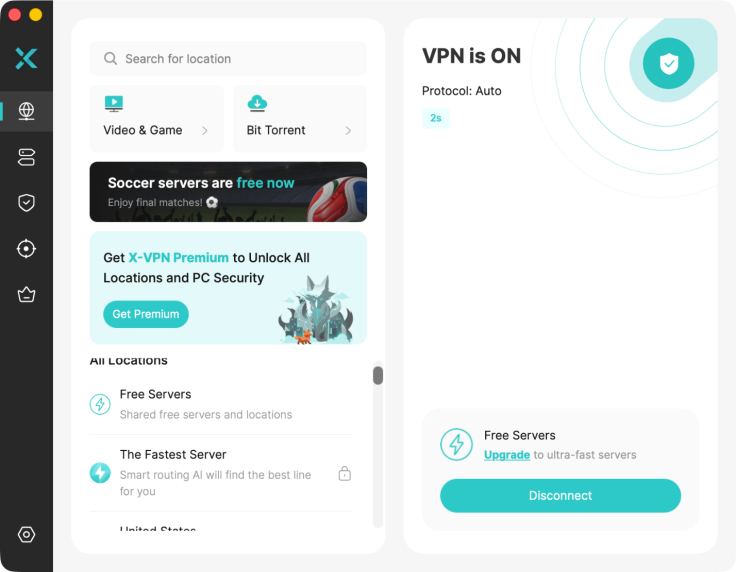
X-VPN free
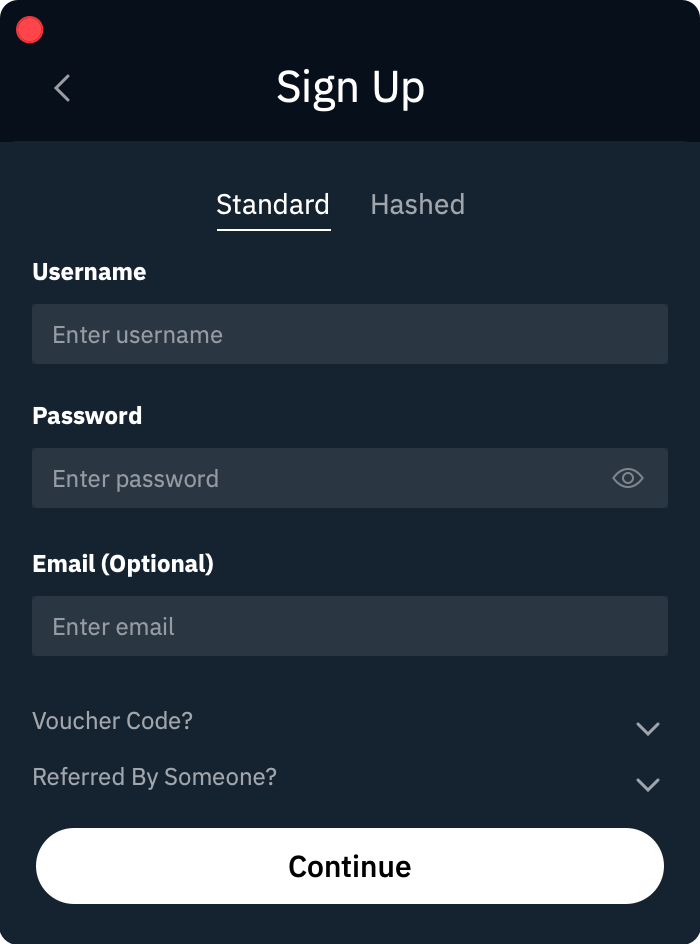
Windscribe free
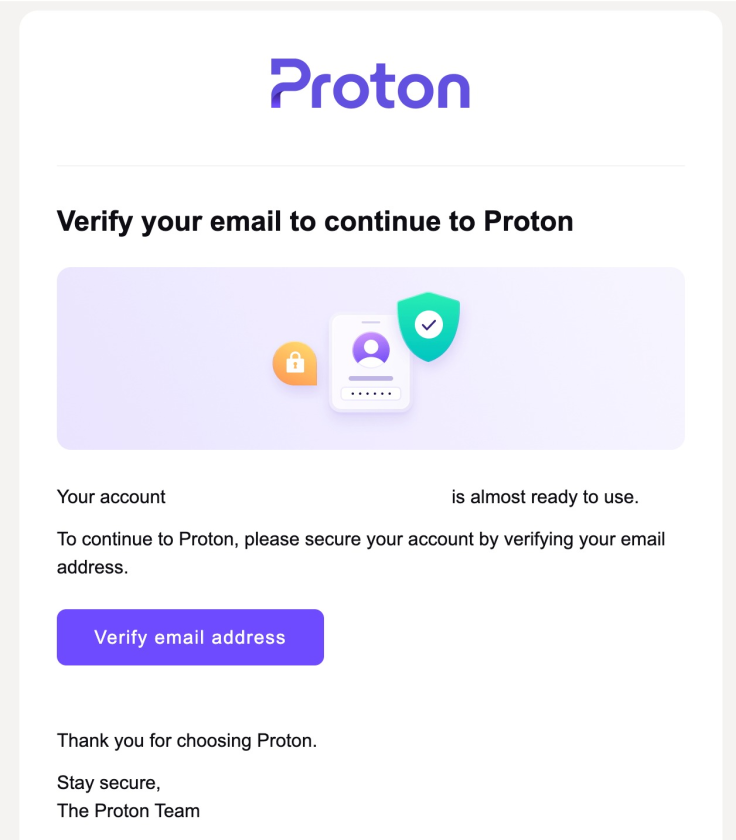
Proton VPN free
X-VPN had the lowest entry barrier and collected the least information during setup. Windscribe offered a middle ground by requiring an account but not an email.
Data Limits
| VPN | Data allowance | Usage counter |
| X-VPN Free | Unlimited | No |
| Windscribe Free | 2GB per month without an email; 10GB with one | Yes |
| Proton VPN Free | Unlimited | No |
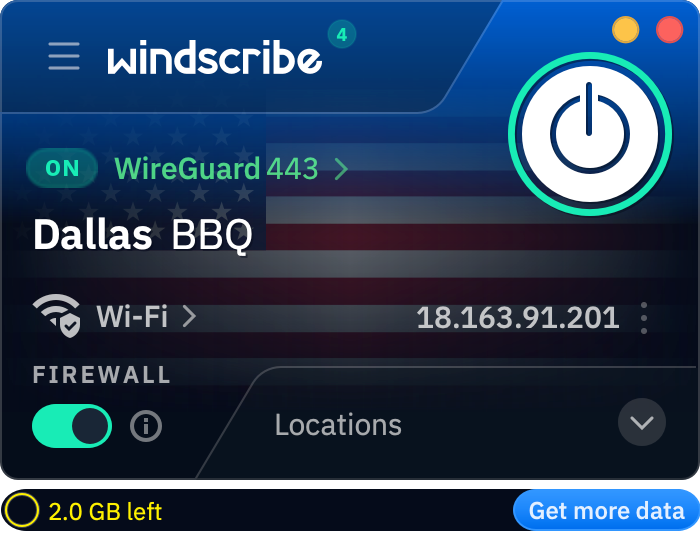
Windscribe limits users to 2GB per month without a verified email address, or 10GB with one
Windscribe clearly displayed the remaining allowance in the app. Its cap may be enough for occasional browsing, but it is more restrictive for continuous use.
Device Limits
| VPN | Free device policy |
| X-VPN Free | Can be used on multiple devices at the same time without an account |
| Windscribe Free | Supports multiple devices |
| Proton VPN Free | Limited to one active device |
X-VPN and Windscribe were easier to use across a laptop and phone. Proton required an upgrade for additional simultaneous connections.
Server Access and Location Control
| VPN | Free locations | Manual selection | City-level servers |
| X-VPN Free | 15 countries in the tested iOS app | Mobile: yes; macOS: automatic connection only | 13 US cities on iOS |
| Windscribe Free | 10 countries | Yes | Available in supported locations |
| Proton VPN Free | Automatically assigned free server | No | No |
Windscribe provided the most consistent manual server control. X-VPN offered country and city selection on mobile, but not on macOS. Proton gave free users the least control, since both the initial server and any replacement were assigned automatically.
Overall, X-VPN was the least restrictive for registration, data, and device use. Windscribe offered better server control but imposed a monthly cap, while Proton combined unlimited data with stricter device and location limits.
Do the Kill Switches Actually Work?
All three free VPNs included a working kill switch, although they handled it slightly differently.
X-VPN and Proton VPN both left the feature off by default, so we had to enable it manually. Windscribe calls its version Firewall rather than Kill Switch, but it serves the same purpose and switched on automatically when we connected to a free server.
| VPN | Feature name | Available on free plan | Default behavior |
| X-VPN Free | Kill Switch | Yes | Off by default |
| Windscribe Free | Firewall | Yes | Turns on automatically when connected |
| Proton VPN Free | Kill Switch | Yes | Off by default |
Kill Switch Test Results
We first opened IPLeak without a VPN and confirmed that it showed our real location and IP address. We then connected each VPN, enabled its kill switch where necessary, and refreshed the page to confirm that the VPN server IP had replaced the original one.
Next, we forced the VPN connection to drop and tried to reload the page.
| VPN | VPN IP shown while connected | Internet blocked after VPN drop | Result |
| X-VPN Free | Yes | Yes | Passed |
| Windscribe Free | Yes | Yes | Passed |
| Proton VPN Free | Yes | Yes | Passed |
In all three tests, the page stopped loading completely once the VPN connection was interrupted. None of the apps allowed the browser to fall back to the regular internet connection.
Speed Test: Which Free VPN Is Fastest?
Speed is where the three free plans showed the clearest difference. X-VPN kept the largest share of our original connection speed, while Proton VPN recorded the biggest slowdown, particularly on uploads.
Test Conditions
We tested all three VPNs in the United States using the same MacBook, Wi-Fi network, and testing period. All results were measured with Speedtest by Ookla.
X-VPN was tested over WireGuard, Windscribe over its Stealth mode, and Proton VPN connected over IKEv2 in our test. We recorded a fresh no-VPN baseline before testing each app. Since the baseline changed slightly between runs, the percentage loss gives a fairer comparison than the raw Mbps figures alone.
Speed Test Results
| VPN | No-VPN Download | VPN Download | Download Loss | No-VPN Upload | VPN Upload | Upload Loss |
| X-VPN Free | 248.01 Mbps | 198.65 Mbps | 19.9% | 216.53 Mbps | 138.03 Mbps | 36.3% |
| Windscribe Free | 247.90 Mbps | 114.31 Mbps | 53.9% | 213.25 Mbps | 91.61 Mbps | 57.0% |
| Proton VPN Free | 235.27 Mbps | 88.05 Mbps | 62.6% | 203.97 Mbps | 5.76 Mbps | 97.2% |
X-VPN delivered the fastest result in our test configuration. It retained about 80% of the baseline download speed and remained comfortably fast for browsing, downloads, and high-resolution video.

X-VPN baseline speed without a VPN: 248.01 Mbps download and 216.53 Mbps upload
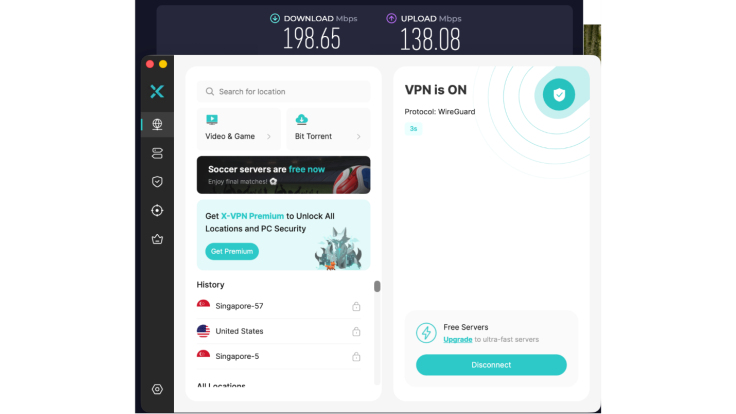
X-VPN Free speed over WireGuard: 198.65 Mbps download and 138.03 Mbps upload
Windscribe remained usable, but its download speed fell by about 54%, while uploads dropped by 57%.

Windscribe baseline speed without a VPN: 247.90 Mbps download and 213.25 Mbps upload
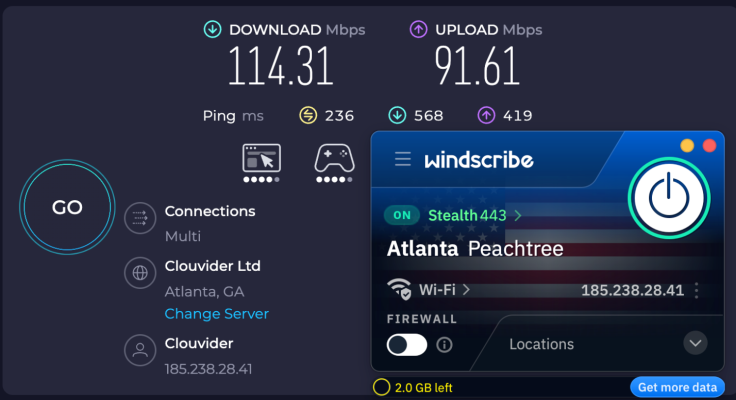
Windscribe Free speed over Stealth mode: 114.31 Mbps download and 91.61 Mbps upload
Proton VPN had the weakest result. Download speed fell from 235.27 Mbps to 88.05 Mbps, and upload speed dropped to just 5.76 Mbps. The download connection was still sufficient for everyday browsing and other download-heavy tasks, but the upload result could be restrictive for cloud backups, large file transfers, or video calls.

Proton VPN baseline speed without a VPN: 235.27 Mbps download and 203.97 Mbps upload
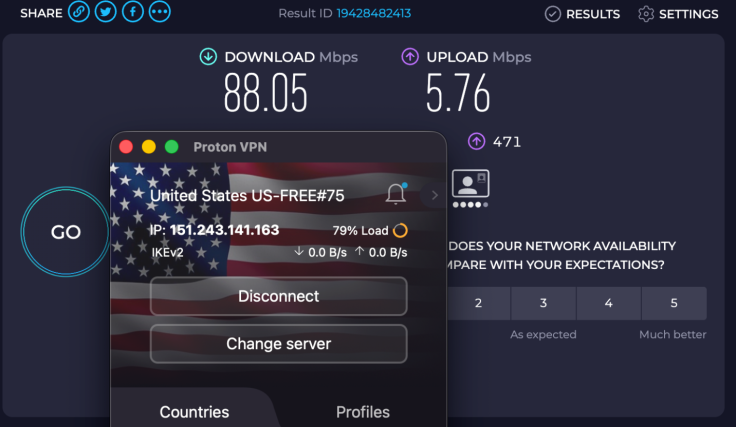
Proton VPN Free speed over IKEv2 during our test: 88.05 Mbps download and 5.76 Mbps upload
Speed Verdict
Based on this round of testing, X-VPN Free delivered the best balance of download and upload performance. Windscribe placed second, while Proton VPN showed the largest speed loss.
These results reflect the free server assigned or available during our test, rather than the maximum speed each service can achieve. Free-server load, distance, and automatic server selection can all affect performance, so results may differ by location and time.
Ads
The three free apps handled ads very differently.
| VPN | Desktop ads | Mobile ads | What we found |
| X-VPN Free | None | Yes | The macOS app was completely ad-free. On mobile, an ad appeared when connecting and closed automatically after a short wait. |
| Windscribe Free | None | None | We did not encounter ads during testing. |
| Proton VPN Free | None | None | We did not encounter ads during testing. |
X-VPN's desktop experience was just as clean as Windscribe and Proton VPN. Its mobile ads added some friction, but they did not prevent us from connecting or using the VPN normally. Windscribe and Proton VPN provided the cleaner overall experience because neither displayed ads.
Protocol Choice on the Free Plans
Which Protocols Are Available?
| VPN | Available protocols | Manual selection |
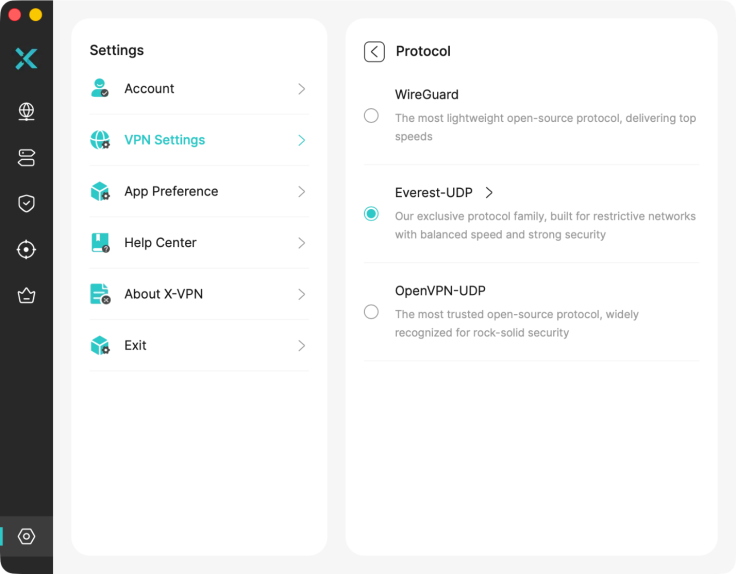
| X-VPN Free | WireGuard, OpenVPN, Everest | Yes |
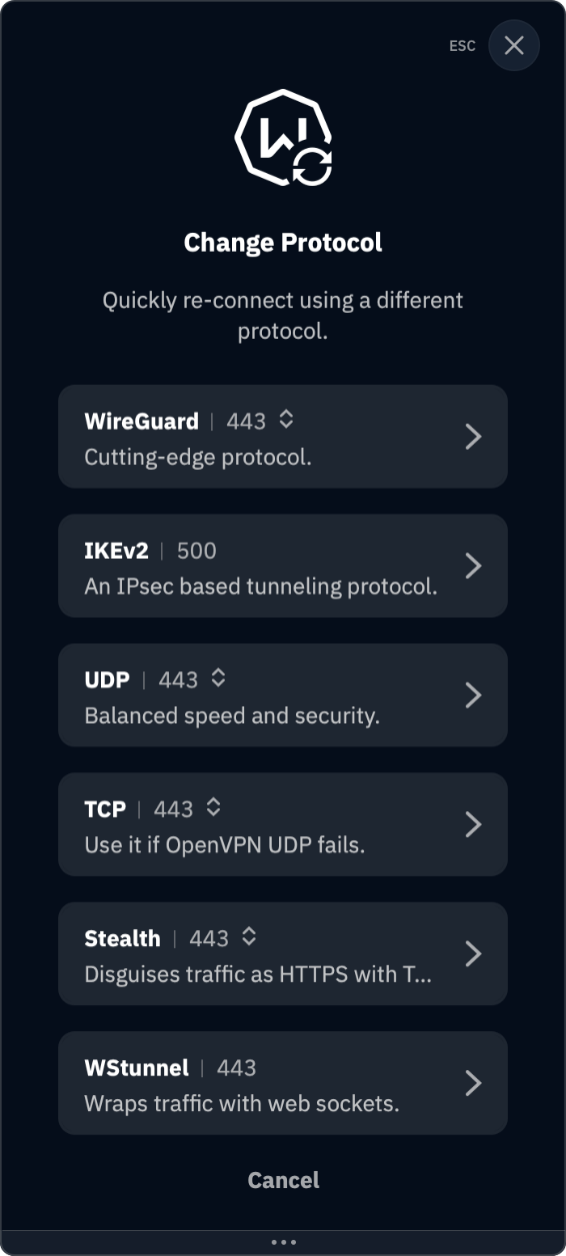
| Windscribe Free | WireGuard, OpenVPN, IKEv2, Stealth | Yes |
| Proton VPN Free | Managed automatically; IKEv2 in our test | No |
X-VPN Free let us manually select Everest, OpenVPN, or WireGuard. These options were available without upgrading or signing in.
Windscribe also offered several protocols, including WireGuard, IKEv2, OpenVPN, and its Stealth mode.
Proton VPN took a simpler approach: the free app selected the connection protocol automatically and did not provide a manual protocol menu.
Are the Protocols Easy to Find?
X-VPN displayed each protocol by name under VPN Settings > Protocol, making the options easy to find and switch between.
Windscribe also showed protocol names inside the app.
Proton VPN required no protocol setup, which may be easier for beginners, but it also gave free users no control over which protocol was used.
Overall, X-VPN and Windscribe offered the most flexibility. Proton prioritized automatic configuration over manual choice.
Privacy: What Do Free Users Give Up?
All three services extend their core no-logs protections to free users. The main difference is how much information they require at signup and how much limited account data they retain.
X-VPN Free
X-VPN applies the same no-logs policy to free and paid users. Its systems and supporting operations underwent an independent limited assurance engagement by Deloitte Singapore under ISAE 3000 (Revised), with testing concluded on February 28, 2026.
According to the report and privacy policy, X-VPN does not collect or store user or destination IP addresses, browsing activity, visited websites, VPN server information, DNS queries, downloaded content, connection timestamps, or sensitive payment details. Free users can also connect without creating an account or providing an email address, giving X-VPN the strongest data minimization at signup.
Windscribe Free
Windscribe requires a username and password, but an email address is optional. Its privacy policy states that it does not store source IP addresses, visited websites, or historical VPN sessions.
It does retain the total amount of data transferred over a 30-day period, the timestamp of the account's last activity, and the number of simultaneous connections. Windscribe says this information is used to enforce free-plan limits and prevent abuse rather than track browsing activity.
Windscribe has also published independent audits of its FreshScribe server stack, desktop app, and mobile apps. These are presented as infrastructure and application security audits rather than a recurring annual no-logs assurance program.
Proton VPN Free
Proton VPN's no-logs policy covers both free and paid users. It states that it does not log internet traffic, communication content, or VPN session data.
Its no-logs infrastructure has undergone five consecutive annual audits by Securitum. The 2026 review examined whether Proton stored browsing activity, DNS queries, destination services, traffic content, or user-identifiable connection metadata and found no persistent records linking a user to activity through the reviewed servers.
Proton required us to create an account and provide an email address. That adds more account data than X-VPN or an email-free Windscribe account, although it does not mean Proton records VPN activity.
Ease of Use
| VPN | Setup | Server control | Protocol controls | Ads |
| X-VPN Free | Install and connect; no account required | Automatic on macOS; manual country and US city selection on mobile | Clearly labeled and manually selectable | None on desktop; connection ads on mobile |
| Windscribe Free | Install, create a username and password, then connect | Manual country and city selection | Clearly labeled and manually selectable | None |
| Proton VPN Free | Install, create an account with an email, then connect | Server list is clear, but selection is automatic | Protocol selected automatically | None |
Final Scorecard
Because stability and streaming were not included in the final comparison, we used the following weights:
| Category | Weight | X-VPN Free | Proton VPN Free | Windscribe Free |
| Free-plan value | 20% | 9.5 | 7.5 | 7.5 |
| Privacy and data handling | 25% | 9.0 | 9.5 | 8.0 |
| Security and kill switch | 20% | 9.0 | 9.0 | 9.5 |
| Speed | 20% | 9.0 | 4.5 | 7.0 |
| Ease of use and ads | 10% | 8.5 | 8.0 | 8.0 |
| Protocol choice | 5% | 9.5 | 4.0 | 9.5 |
| Overall | 100% | 9.1/10 | 7.6/10 | 8.1/10 |
Final Verdict: Is X-VPN Free Worth Using?
Yes. X-VPN Free is worth considering for users who want a VPN they can install and use immediately without creating an account, watching a data counter, or managing device slots.
Its main advantage over Proton VPN and Windscribe is not a single feature. It is the combination of no registration, unlimited data, unlimited device use, a working kill switch, manual protocol selection, and the best speed result in the configuration we tested. Its main compromises are mobile ads and more limited server control on macOS.
© Copyright 2026 IBTimes AU. All rights reserved.