

21 Hidden Features Of Apple's New iPhone Duo Foldable You Might Not Know About Yet
Discover the iPhone Duo's 21 Unique Features Designed for Its Foldable Form
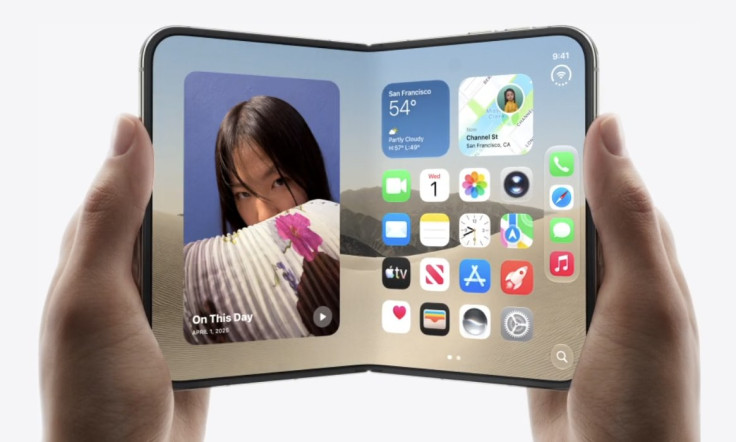
CUPERTINO, Calif. — Apple's first foldable iPhone, unveiled Wednesday at a launch event led by new CEO John Ternus, packs far more than a folding screen. Beyond the headline specs, Apple built an extensive set of software and hardware features specifically designed around the device's dual-display form factor. Here are 21 of the lesser-known functions built into the iPhone Duo.
- Split View lets you run two apps side by side. For the first time on any iPhone, iOS 27 allows users to open two separate apps simultaneously on the Duo's 7.6-inch inner display, taking full advantage of the expanded screen real estate the foldable design provides.
- You can open two windows of the same app at once. Split View isn't limited to different apps; Apple specifically cited the ability to open two Safari windows side by side, useful for tasks like comparison shopping between two web pages.
- App pairs can be saved for later. Frequently used combinations of two apps can be saved together, letting users quickly reopen a familiar Split View setup without manually rebuilding it each time.
- You can talk to Siri AI while viewing content on the other half of the screen. Apple designed the multitasking layout so users can carry on a conversation with the redesigned Siri AI assistant while simultaneously keeping another app or piece of content visible alongside it.
- StandBy now works even when the phone isn't charging. Setting the Duo down triggers StandBy mode on either the inner or outer display, turning the device into a photo frame, widget hub or bedside clock, regardless of whether it's plugged in.
- New StandBy faces include Calendar and Weather. These join the existing Clock and Modular faces previously available in StandBy mode on other iPhones.
- The Photos StandBy face now displays Shared Albums. Users can showcase collaboratively curated photo collections directly through StandBy rather than only their personal camera roll.
- Every StandBy face offers deeper customization. Apple added new color options, fonts and complications across all available StandBy faces on the Duo.
- The device adapts to five distinct physical positions. Apple's marketing describes Landscape, Portrait, Closed, Seated and Standing modes, each triggering a tailored interface layout optimized for that specific way of holding or positioning the phone.
- In Landscape mode, the display is built for immersive entertainment and Split View multitasking. Apple positions this as the ideal orientation for watching video content alongside a second active app.
- In Portrait mode, you get a wider keyboard and more room to scroll. Opening the Duo in this orientation offers additional typing comfort along with expanded browsing space compared with a standard iPhone screen.
- You can pin a video to the top of the screen while using another app underneath it. This picture-in-video-style layout lets users keep watching content without dedicating the entire display to it.
- When Closed, essential controls shift to the side for easier reach. Apple redesigned the compact, folded-shut experience so that key controls remain within comfortable thumb range despite the narrower form factor.
- The Seated position sets up an ideal angle for watching shows or following workouts. Apple designed this mode specifically for placing the Duo down on a surface with controls still easily accessible from the bottom.
- The Standing position adjusts the outer display's angle for movies and shows. This mode lets users prop up the Duo to watch content on the smaller external screen at a customizable viewing angle.
- The under-display FaceTime camera stays completely hidden until needed. Built beneath the inner display itself, the camera doesn't interrupt the screen's visual continuity when not actively in use.
- A nano-texture finish on the inner display reduces glare. Apple engineered the 7.6-inch panel using 10 ultrathin layers specifically to minimize reflections during everyday use.
- The Dynamic Island has been redesigned to run vertically along the side. Rather than sitting at the top of the screen as on standard iPhones, the Duo's Dynamic Island appears along the edge of both the inner and outer displays and expands to show alerts and Live Activities.
- A new "Call Context" widget has been added, though Apple has not detailed exactly what information it displays during calls, according to reporting from MacObserver.
- Apple Pencil with USB-C support is coming to the Duo later this year, enabling note-taking and markup on either the inner or outer display once the feature rolls out.
- The iPhone Duo is eSIM-only worldwide, with no physical SIM tray included in any country, according to Apple's official press materials, extending the eSIM-exclusive approach Apple first adopted with certain U.S. iPhone models to its entire global foldable lineup.
Beyond these specific functions, Apple has repositioned core interface elements throughout iOS 27 to accommodate the Duo's unique shape. The Dock, app navigation controls and Lock Screen elements have all shifted toward the sides of the display to preserve additional vertical space for content, while opening the device reveals two full Home Screen pages displayed alongside a scrollable Today View widget list.
Apple has said its own built-in apps have been specifically optimized for the new dual-screen format, while third-party developers can adapt their own software using newly released APIs designed for the foldable layout. According to reporting from The Apple Post, apps including Netflix, Zoom and Slack are among the early developers already building support for the Duo's expanded multitasking capabilities.
Notably, several aspects of the software experience remain unconfirmed even after Wednesday's presentation. According to MacObserver, Apple has not published detailed information about how older, non-optimized apps will behave when opened on the Duo's wider canvas, nor has the company confirmed whether any of these interface changes will eventually extend to other iPhone models beyond the Duo itself. With no independent reviewers having used the software firsthand as of Wednesday's announcement, many of these newly revealed functions will require hands-on testing once review units become available ahead of the device's Oct. 23 launch to fully assess how they perform in everyday use.
© Copyright 2026 IBTimes AU. All rights reserved.