Why PureVPN is the Most Reliable VPN for Windows Devices in 2026
Windows is the world's most widely used desktop operating system, which also makes it the most targeted. Hackers, ISPs, data brokers, and surveillance systems all treat Windows machines as prime territory.
Most VPNs do one thing in response: encrypt your traffic and call it a day. PureVPN takes a different approach. It's built an entire privacy ecosystem specifically tuned for Windows users, with a native app that keeps improving, a robust set of Windows-specific features, and a collection of add-ons that go far beyond what standard VPN services offer. Here's a complete breakdown.
A Native Windows App Built for Your PC, Not Borrowed From Another Platform
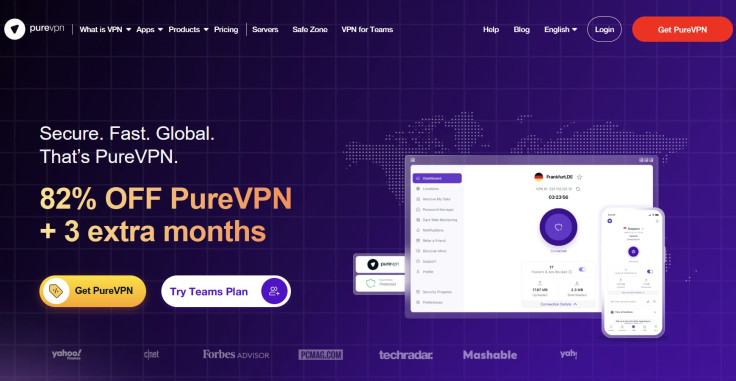
PureVPN offers a dedicated Windows VPN app compatible with Windows 10 and above, with manual configuration support for older versions as well. The app has seen consistent updates through 2025 and into 2026, including a fully redesigned settings screen with smarter grouping, quicker access to key controls, and a smoother post-purchase experience.
Shortcuts: One-Tap Server Access for Streaming
Inside the locations section, you can save your favorite streaming platforms alongside your preferred server location for each one. Instead of hunting through thousands of servers every session, a single tap puts you on the right server instantly. It's a small feature that eliminates a daily friction point most VPN apps simply ignore.
20 Gbps Infrastructure: Speed That Won't Hold Your Windows PC Back
One of the most common complaints about VPNs on Windows is the slowdown. PureVPN runs on a 20 Gbps backbone, faster than the internet connection available in most homes and businesses.
In practical terms, the VPN infrastructure itself is never the bottleneck when you're downloading, video calling, or streaming. Whatever limitation you experience comes from your ISP, not PureVPN.
DNS Leak Protection, IPv6 Protection, and WebRTC Blocking
Windows has a well-known vulnerability where DNS requests can bypass the VPN tunnel entirely, revealing your browsing activity to your ISP even when you think you're protected. PureVPN's DNS Leak Protection reroutes all DNS queries through its own secure servers, closing that gap.
On top of that, it blocks IPv6 leaks and browser-based WebRTC leaks, both of which are common on Windows browsers like Edge and Chrome and can expose your real IP address even while the VPN is active. You can verify your exposure anytime using PureVPN's DNS Leak Test, IPv6 Leak Test, and WebRTC Leak Test tools.
Obfuscated Servers: Stay Connected in Restricted Environments
If you're on a corporate network, a university connection, or in a country that restricts VPN usage, PureVPN's obfuscated servers disguise your VPN traffic so it looks like regular HTTPS browsing.
This makes PureVPN functional in environments where other VPNs get detected and blocked. A VPN that gets blocked isn't reliable regardless of its other specs, and obfuscation directly solves that problem for Windows users.
Internet Kill Switch: Protection When the Connection Drops
If the VPN connection drops unexpectedly while you're on your Windows PC, the Internet Kill Switch automatically cuts your internet access entirely until the VPN reconnects. Without it, even a brief dropout exposes your real IP address to your ISP and any site you're on.
On Windows, where background updates and network changes can cause momentary disruptions, a consistently working kill switch is a genuine reliability feature, not just a checkbox.
Split Tunneling: Route Only What You Want Through the VPN
Split tunneling gives you per-app control over which programs route through the VPN and which connect directly through your ISP. On a Windows machine running multiple applications at once, this is genuinely useful.
You can route your browser and work apps through the VPN while keeping cloud backups or local network apps on a direct connection for better speed. The choice stays with you and is adjustable from within the Windows interface.
Secure Home Network Access and File Transfers
PureVPN's Windows VPN app lets you securely connect back to your home network from anywhere, giving you access to home NAS drives, printers, IP cameras, and smart home systems without exposing them to the open internet.
It also encrypts file transfers over unsecured networks end to end. Whether you're syncing OneDrive or Dropbox on a hotel or cafe Wi-Fi, your data goes through an encrypted tunnel rather than the open connection, preventing interception or malware injection during transmission.
Residential Proxy: Browse Like a Local, Not Like a VPN User
This is one of PureVPN's most distinctive add-ons. The Residential Proxy routes your traffic through IP addresses sourced directly from real Internet Service Providers, linked to actual physical households. This means your online activity appears to come from a genuine home user rather than a VPN datacenter.
For Windows users, this matters in several practical situations. Standard VPN IPs are increasingly flagged and blocked by platforms that detect datacenter traffic, including streaming services, AI tools like ChatGPT, region-specific shopping sites, and social media platforms.
A residential IP bypasses these blocks entirely because it looks indistinguishable from a regular home connection. PureVPN's residential IPs also rotate automatically, reducing detection risk further. Plans start at 12 GB per month with US and UK locations currently available, and all proxies are 100% ethically sourced with free geo-targeting included.
Dark Web Monitoring: Know When Your Data Has Been Exposed
Available on the Max plan, Dark Web Monitoring continuously scans underground forums, breach databases, and illicit marketplaces for your personal information. If anything surfaces, you receive a real-time alert.
For Windows users who store financial credentials, work logins, or sensitive personal documents on their machines, this is a meaningful layer of protection that operates independently of the VPN connection itself. You don't need to actively do anything. It runs in the background and alerts you the moment a threat is detected.
Dedicated IP: Your Own Fixed Address on the Internet
A Dedicated IP assigns you a unique, exclusive IP address that no other PureVPN user shares. This matters more than it might seem. With a shared IP, you're effectively sharing an online reputation with thousands of other users. If any of them trigger a block or a CAPTCHA on a platform, you inherit that problem. With a Dedicated IP, your address is your own.
On Windows, the practical benefits are significant: consistent access to platforms that use IP-based access controls, reduced risk of being blacklisted, smoother experience with email marketing tools and business platforms, and faster access on services that prioritize known, trusted IPs. It's particularly valuable for remote workers and small business owners who access the same platforms daily and can't afford random access disruptions.
Port Forwarding: Full Control Over Your Windows Machine's Connections
Port Forwarding is the add-on for Windows users who need their machine to be reachable from the internet on specific ports, without opening up their entire system. It lets you access your PC, laptop, or home server from anywhere in the world, share access to a website or FTP service, allow friends to join a game server you're hosting, and manage router-level port configurations when running PureVPN on a router.
The combined Dedicated IP and Port Forwarding bundle pairs both capabilities together at a lower cost than purchasing them separately. It's built for users who need remote desktop access, run game servers, manage web infrastructure, or work with P2P applications requiring stable port configurations. These are tasks that would normally require a separate, more complex technical service.
DDoS Protection: Always-On Defense for Gamers and Businesses
PureVPN's DDoS Protected IP add-on is particularly relevant for Windows gamers and small business owners. Rather than reacting to attacks after they cause disruption, it monitors traffic continuously and neutralizes threats the moment they're detected, without requiring you to manually activate anything.
Gamers get fewer lag spikes and more stable connections during matches. Businesses get an always-on defense layer against illegitimate traffic targeting their operations. You can add this alongside other extras when you choose your plan.
PureVPN Password Manager That Lives Inside the Windows App
Rather than pointing users toward a third-party password manager, PureVPN ships its own. The PureVPN Password Manager stores unlimited passwords, generates strong ones automatically, syncs across up to 10 devices, and includes a breach scanner that flags exposed credentials.
On the Windows app specifically, It opens directly inside the PureVPN interface with Auto-Fill support added in early 2026, so credentials populate automatically across apps and websites without switching between separate tools.
Remove My Data: Getting Your Information Off the Internet
The Remove My Data feature, available on the Max plan, tracks down data brokers that hold your personal information and submits removal requests on your behalf. It then monitors whether those requests have been honored. For Windows users who shop, bank, or work online, this is a direct and practical solution that goes far beyond what any standard VPN offers.
Browser Extensions for Edge, Chrome, and Firefox
For Windows users who want browser-level protection without routing all system traffic through the VPN, PureVPN offers dedicated extensions for Chrome, Firefox, and Edge. These work within the browsers most Windows users already have installed, adding a lightweight privacy layer for web sessions without affecting how other applications connect to the internet.
Anonymous Purchase Options, Including Bitcoin
For Windows users who want privacy from the moment of purchase, PureVPN accepts Bitcoin and other cryptocurrencies alongside PayPal and standard credit cards. Paying with crypto means no financial trail connecting your identity to your VPN subscription, a meaningful detail for users with serious privacy requirements. You can review all available payment methods on the order page.
Final Thoughts
What makes PureVPN reliable for Windows users in 2026 isn't any single feature. It's the combination: a native, actively maintained Windows VPN app running on 20 Gbps infrastructure, leak protection built for Windows-specific vulnerabilities, and a layered set of add-ons that address real problems most VPNs don't touch.
A Residential Proxy for bypassing IP blocks, Dark Web Monitoring for credential exposure, a Dedicated IP for consistent trusted access, Port Forwarding for remote control of your own machines, and DDoS protection for uninterrupted sessions. If you're looking for a VPN that treats Windows as a primary platform and privacy as a full-stack problem, PureVPN makes a clear and well-grounded case.
© Copyright 2026 IBTimes AU. All rights reserved.
- Recommended For You